Shiba Inu Wall Art Made From a Photo of Your Shiba
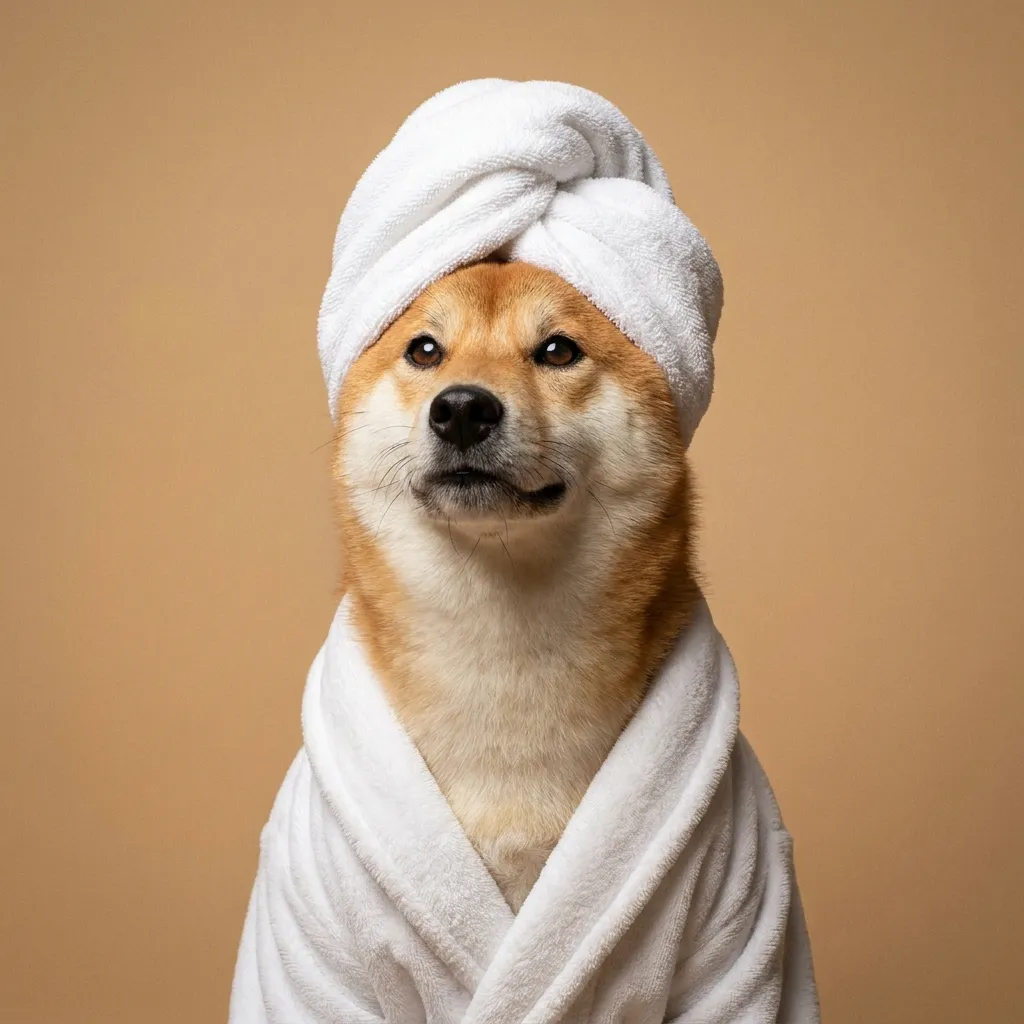
A spa portrait of your own Shiba Inu, made from one photo you upload: your dog's face and coloring in a white robe and towel turban on a studio backdrop. It arrives as a digital file, and the printing is yours to do.
You Get a Portrait File of Your Shiba, Not a Parcel
What you buy is a digital portrait file made from your photo: Shiba Inu art of your own dog, with its own face and coloring. No painting, poster or print is boxed up and sent to you: the only thing that changes hands is an image you download.
That image is 3840px and print-ready. Printing, framing and choosing a wall are all on your side.
Why a Shiba's Pale Cheeks and Throat Carry the Portrait
A Shiba's lighter markings sit on the face and throat, which is exactly the part a spa portrait leaves open. With a towel turban wrapped above the eyes and a white robe closed over the chest, the open area is the cream fur from muzzle to upper throat.
An example spa portrait of a Shiba Inu. Yours is made from your own photo.
The urajiro.Wikipedia says "All have a cream to white ventral color, known as urajiro". It places that pale fur "on the sides of the muzzle, on the cheeks, inside the ears, on the underjaw and upper throat". In the example portrait the turban covers the ears, while the cream cheeks, muzzle and throat stay in view and run down into the robe's collar.
The three standard colors. Wikipedia states: "The breed's standard colors are red, sesame and black and tan." The example portrait shows a red Shiba with dark eyes and a black nose. Yours follows whichever coat your dog has in the photo.
The coat. Wikipedia describes a double coat in which "the topcoat is stiff with guard hairs and the undercoat is soft and plush", and adds that "Although less common, Shiba Inu can also be long-haired". With the robe closed over the body, the coat shows mostly around the face and neck.
The size.The AKC calls the breed "a little but well-muscled dog once employed as a hunter." The robe hides the build, but a small dog changes how you should hold the camera.
A Shiba Inu Painting Is Made by Hand; This Portrait Is Digital
A painted Shiba comes from an artist's brush, and this portrait does not: it is generated digitally from the photo you upload, with no hand-painting involved.
If you would rather have your Shiba painted by a person, that is a commission: the money buys an artist's time, and the artist names the price and sets the schedule. With this portrait, you see your dog in the turban before any money changes hands.
Taking a Photo That Keeps the Urajiro and the Coat
The likeness comes from your photo, so shoot for the face and the pale markings rather than the whole dog.
Keep the cream fur from washing out. Strong sun can turn cream cheeks and a pale throat into flat white. Open shade or a bright overcast day holds the line between the urajiro and the rest of the coat.
Light a darker face from the front. On a black and tan dog the eyes can disappear into dark fur. Seat your Shiba facing a window, so daylight reaches the eyes inside the dark fur.
Use soft light for the coat. Diffuse light shows the texture of a stiff topcoat or a long-haired coat around the neck, which is the coat the robe leaves visible.
Crouch to nose height. With a little dog, a phone held at standing height looks down on the top of the head. Bring the lens level with the eyes.
Favor the face over the ears. In the example portrait the turban covers the ears, so a clear, front-on face with open eyes matters more than the ears.
Hold the preview next to your photo. Likeness depends on the photo you give it, and small markings, such as where the cream urajiro meets the darker coat, can come out differently.
Upload, Preview Free, and Pay $5 Only If It Looks Like Your Dog
You pay nothing until you have seen your Shiba in the turban.
Add your photo. The portrait app takes one picture of your Shiba, ideally the front-on, soft-light one.
Choose a backdrop color. It is the only setting there is: Cream, Charcoal, Oat, Sage or Lilac. You might try one that stands apart from your dog's red, sesame or black and tan coat.
Check the watermarked preview. It is free and shows up in about 30 seconds.
Buy the file. Once you pay $5, the unwatermarked 3840px print-ready version waits on the page shown after payment.
Every buyer can claim a full refund within 24 hours of payment.
Printing Your Shiba's Portrait and Picking a Spot for It
Putting the file on paper is your job: a home printer can do it, or a print counter, which sets its own price.
Size by size, the dog portrait printing guide checks what the 3840px file holds up to. A 5x7 of that cream-cheeked face has more detail than it needs and suits a card, 8x10 is the sharp, safe pick, 11x14 remains sharp at normal viewing distance, and 12x16 lands exactly on the common floor. Blown up to 16x20 as a Shiba Inu poster, it looks fine across a room and softer when you stand close.
Order a Shiba Inu print once, and when you want more Shiba Inu decor later, reprint from the same file. Where it goes is your call: one suggestion is a shelf near the door, another is a frame in the room where your dog sleeps. Framed, it is Shiba Inu wall art of your dog in particular, in its own red, sesame or black and tan.
Questions About a Shiba Inu Portrait
Can I turn my Shiba Inu's photo into wall art?
Yes. One photo of your Shiba Inu becomes a spa portrait of that same dog, with its own cream cheeks and coat color, dressed in a white robe and towel turban. Your free watermarked preview, turban already on, takes about 30 seconds. Pay $5 after that and the 3840px print-ready file is yours to download and print wherever you like.
Is it a physical print or a digital file?
A digital file. Nothing physical leaves our hands: no print, no frame, no package. After payment, the page you land on has the 3840px download, which you can take to a home printer or to a print counter that sets its own price, as often as you want.
Does it work for a sesame or a black and tan Shiba Inu?
Yes. The portrait works from your photo, not from a breed standard, so a sesame or black and tan Shiba keeps that coloring. Wikipedia lists red, sesame and black and tan as the breed's standard colors and notes that some Shibas are long-haired. Small markings can shift, so hold the preview up against your photo.
How much does a Shiba Inu portrait cost?
$5 buys one clean 3840px print-ready file of your Shiba, after a free watermarked preview you look at first. Paper, ink or a print counter's charge, and any frame, come on top of that. A full refund within 24 hours of payment is open to you.
Can I see the portrait before I pay?
Yes. Before you pay anything, a free watermarked preview of your Shiba shows up in about 30 seconds. Look at the cheeks, muzzle and throat against your photo. When the face reads as your dog, $5 gets the clean file; when it does not, upload a front-on photo taken in soft light and compare again.