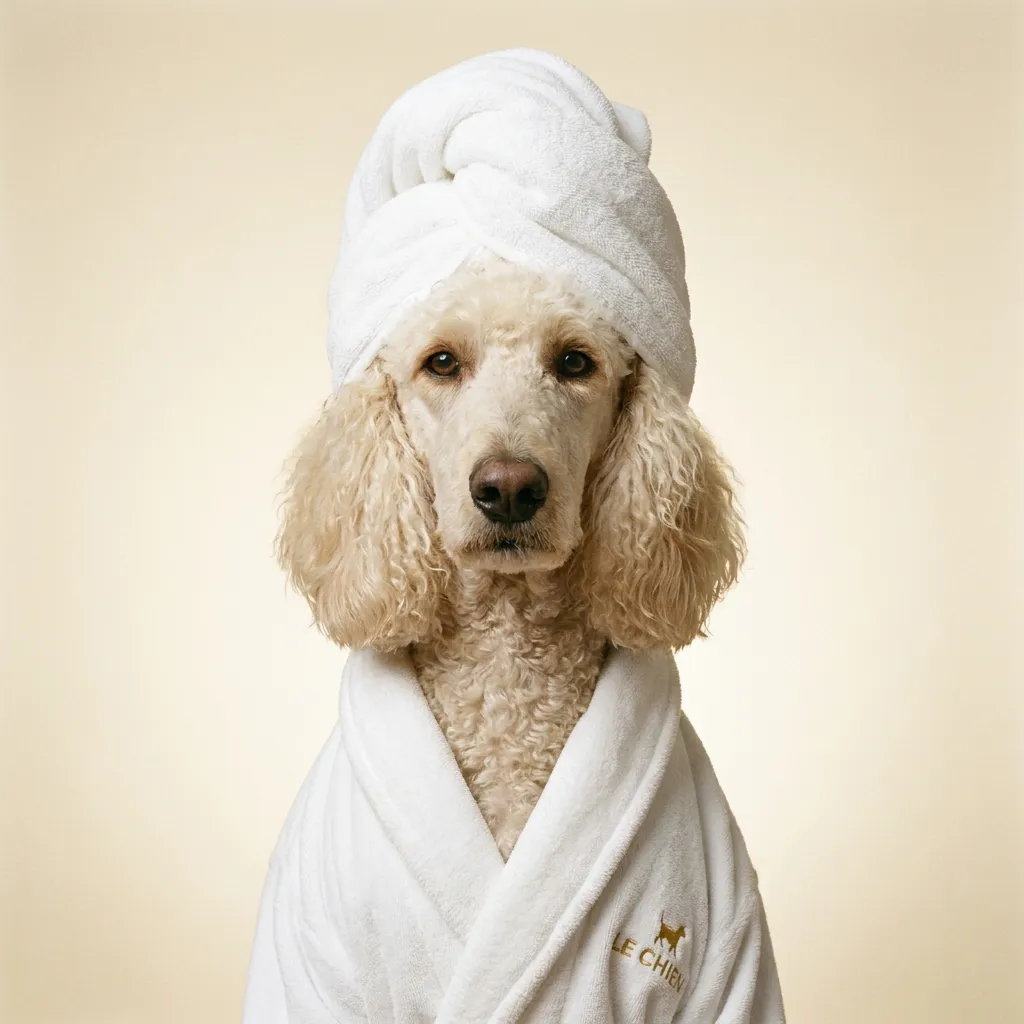
A spa portrait of your own poodle, made from one photo you upload: your dog in a white robe and towel turban on a studio backdrop. This is poodle art you print yourself from a digital file, not something we paint or mail.
Your poodle comes back as a digital portrait file built from the photo you upload. A model renders the curls, not a painter, and nothing arrives by post because the site makes no physical item.
A commissioned painting is a different purchase. That buys an artist's hours, on a price and timeline the artist sets. Here a model works from your upload, you look at a watermarked preview first, and what you buy is a 3840px print-ready file.
The rest is yours to decide. Hang it as poodle decor beside the bathroom mirror, or take the file to a print counter and have a poodle poster made for a hallway.
What the Curly Coat Brings to Poodle Art
A poodle portrait is mostly curls and ears, and the spa format keeps both in view. The turban covers the crown, the robe covers the body, and the face, the ears and the curly chest stay in view.
An example spa portrait of a Poodle. Yours is made from your own photo.
The coat.Wikipedia describes "a distinctive thick, curly coat that comes in many colours and patterns." The example portrait shows that texture twice: in the ears and in the V of the robe at the chest.
The ears. The example portrait shows long, curly ears hanging out from under the turban on both sides, framing the face like a hood.
The face. Wikipedia says the most popular show clip is the Continental clip, "where the face and rear end of the body are clipped". The example portrait shows a short-clipped muzzle, with the curls starting at the cheeks.
The build.The AKC writes: "Beneath the curly coat is an elegant athlete and companion for all reasons and seasons." The robe hides the athlete, so the portrait rests on the head and the coat.
The colors. The AKC page opens with "Whether Standard, Miniature, or Toy, and either black, white, or apricot", and Wikipedia adds brown, blue, gray and silver to the list. The portrait takes its color from your photo.
Photo Tips for Curls, Dark Coats and Small Poodles
A poodle's coat is the hard part to photograph, and the photo sets the likeness. These tips follow from the curls, the color range and the size range.
Use soft daylight. An overcast window shows each curl. A direct flash flattens a curly coat into one solid mass.
Light the face of a black or brown poodle. Dark curls swallow the eyes in a dim room. Turn your dog toward the window so the eyes catch a highlight; for black poodle art of your own dog, that highlight keeps the face from reading as a dark shape.
Keep a white or apricot poodle out of hard sun. Bright sun turns pale curls into a flat patch. Open shade keeps the texture.
Set the camera height for the variety. Wikipedia says the breed is divided into four varieties based on size. For a small poodle, get down to the floor or bring your dog up onto a sofa; for a Standard, sit so the lens is level with the eyes.
Leave room for the full ears. The example portrait shows the ears hanging below the turban, so they count. In your photo, keep the ear curls clear of the bottom edge rather than cut off.
Compare the preview with your photo. The preview is only as close as your photo allows, so check the curls, the eyes and any patches against the original. Small markings can come out differently.
From Upload to File: Steps, Price and Refund
Seeing your poodle in the turban is free; keeping the clean file is $5.
Start in the portrait app with a single photo, ideally one taken with the light tips above. Your one decision is the backdrop color; the robe and towel turban are always part of the portrait. About 30 seconds later a watermarked version is on screen, and it costs nothing. When the curls and the eyes look right, pay $5 and download the clean 3840px print-ready file from the page shown after payment. Changed your mind after paying? The refund window is 24 hours from payment, and the refund is full.
Printing Your Poodle Portrait and Choosing a Wall
Printing happens on your side: a home printer, or any print counter at its own rates.
These verdicts come from our guide to printing a dog portrait, which divides the 3840px long side by each print size. A poodle print at 5x7 holds more detail than it needs. 8x10 is sharp and the safe choice, 11x14 stays sharp at normal viewing distance, and 12x16 lands right on the common 240 ppi floor. At 16x20 or 18x24 it reads well from across the room and looks softer up close.
The wall is up to you. A curly face under a white towel suits a bathroom, behind glass so the steam stays off the paper. A hallway or the spot above your dog's bed works too. Framed on that wall, the file becomes poodle wall art of your own curly dog, not a stock poodle.
Questions About a Poodle Portrait
Can I turn my poodle's photo into wall art?
Yes. From one clear photo, the app puts that exact poodle in a white robe and towel turban, with the ears and curls as your picture shows them. You see a free watermarked version within about 30 seconds. Keeping it costs $5 for the 3840px print-ready file, and the printing and hanging are up to you.
Is it a physical print or a digital file?
A digital file. Nothing physical leaves our side: no paper, no frame, no parcel. After paying, you download the 3840px print-ready file from the page shown after payment, then print it on a home printer or at a print counter of your choice, as many times as you want and at any size the print guide covers.
Does it work for a Toy, Miniature or Standard poodle in any color?
Yes. The portrait is made from your photo, so it follows the dog in that photo, whatever its size variety or color. Wikipedia lists poodle colouring that includes white, black, brown, blue, gray and silver. Very dark and very pale coats need careful light, and small markings can come out differently, so compare the preview with your photo.
How much does a poodle portrait cost?
One clean, print-ready 3840px file costs $5. You see the watermarked preview for free first, so you only pay once you know it looks like your poodle. Paper, ink and frames are your own cost, set by wherever you print. Paid and unhappy with it? You have 24 hours from payment to get your money back in full.
Can I see the portrait before I pay?
Yes. The watermarked preview is free and comes up roughly 30 seconds after upload. Hold it up against your photo and look at the eyes, the ears and the curl texture. If something is off, try another photo in softer light, and pay $5 for the clean file only when it looks like your dog.
Upload a photo and the free watermarked preview shows up in about 30 seconds. If it looks like your dog, $5 gets the 3840px file to print at home or at a print counter.