Cavalier King Charles Spaniel Wall Art From a Photo of Your Own Dog
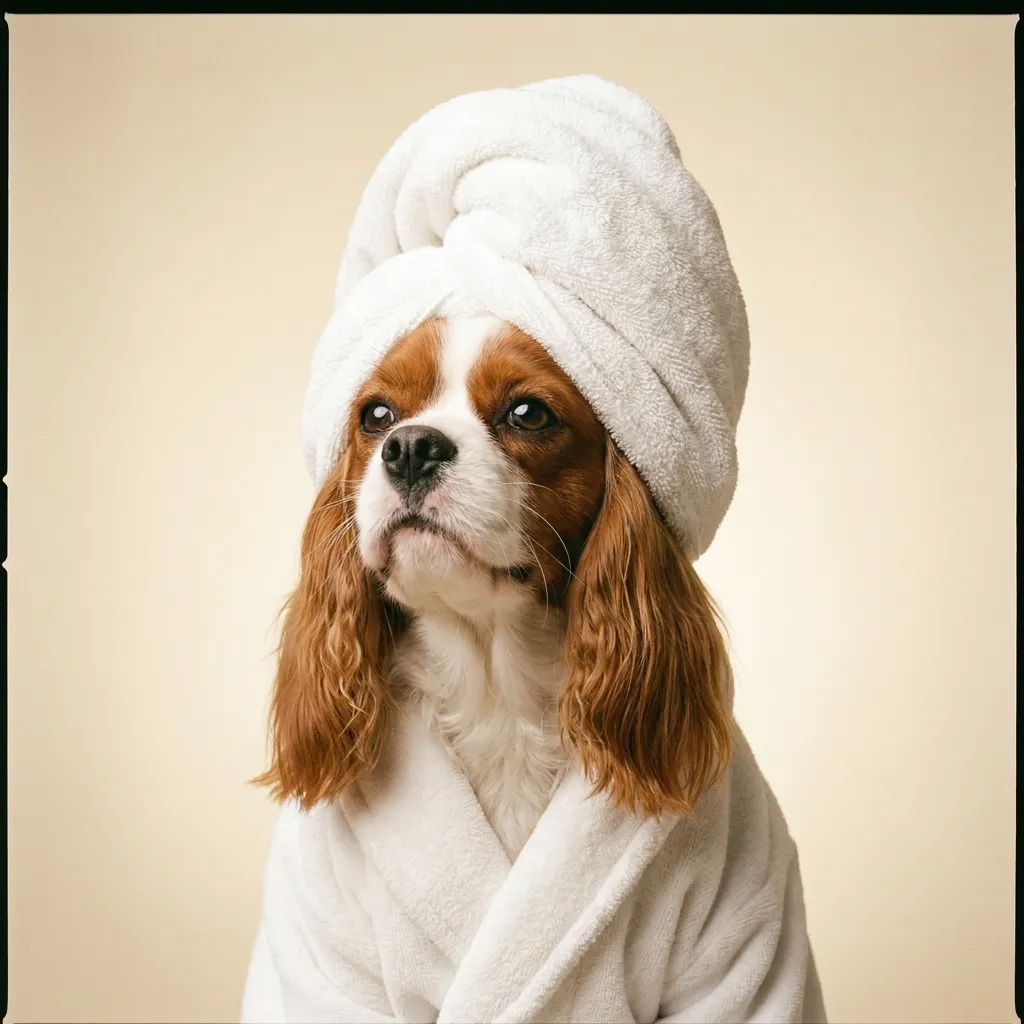
A spa portrait of your own Cavalier, made from one photo you upload: your dog in a white robe and towel turban on a studio backdrop. What you buy is a digital file, and you print it yourself.
What Arrives Is a File of Your Cavalier, Not a Parcel
Your photo of your Cavalier goes in, and a digital portrait file comes out. No poster or print turns up at your door either: the site prints, frames and ships nothing.
The file is 3840px and print-ready. Print that file and frame it, and those long feathered ears become Cavalier King Charles wall art of the dog who shares your sofa.
How the Ears Frame Your Cavalier King Charles Art
On a Cavalier, the turban leaves the best part on show. It covers the top of the head and the robe covers the body, so the face and the two long ears carry the portrait.
An example spa portrait of a Cavalier King Charles Spaniel. Yours is made from your own photo.
The example portrait shows a chestnut and white dog with a white stripe up the middle of the face, chestnut around both eyes, and wavy chestnut ears hanging from under the turban past the jaw and onto the robe. The breed's own description explains why that works.
Feathered ears.Wikipedia notes that "feathering can grow on their ears, feet, legs and tail in adulthood." The feet, legs and tail end up under the robe or out of frame, so in a spa portrait the ears are where all that feathering shows.
A silky coat. The same article says the breed "should have a silky coat of moderate length." Next to the white towel and robe, smooth ear hair stands out as a different texture.
Toy and sporting spaniel at once.The AKC describes the breed as "combining the gentle attentiveness of a toy breed with the verve and athleticism of a sporting spaniel." In the example, the gentle half wins: the dog sits still in its robe and gazes just past the camera.
The coat color. Wikipedia describes a Blenheim as "rich chestnut markings on a pearly white background", which matches the dog in the example. Your portrait starts from your photo, so a tricolour, black and tan or ruby Cavalier keeps its own coat.
Looking for a Cavalier King Charles Painting? Here Is the Difference
This is a digital portrait, not a hand-painted one. A generator builds it from the photo you upload, and you see the result before you pay anything.
A commissioned painting is a separate thing. What you buy there is an artist's hours, so the price and the timeline are theirs to set. If brushwork on a real surface is what you are after, a painter is who to ask. If you want your own Cavalier in a towel turban, checked against your photo first, that is what this page offers.
Photo Tips for a Small Dog With Long, Silky Ears
Your photo decides how much the portrait looks like your dog, so shoot with the ears and the face in mind.
Go down to the dog. Wikipedia puts the average weight between 13 and 18 pounds, so from standing height you mostly see the top of the head. Sit on the floor, or put your dog on the sofa, and hold the phone at eye level.
Brush the ears first. The portrait follows the photo, so tangled or flipped-over feathering is worth a quick brush before you shoot. Let the ears hang the way they normally do.
Leave room below the chin. Long ears run well past the jaw. Frame loosely enough that both tips are in the picture you upload.
Wait for a calm moment. That sporting-spaniel verve means blurry shots mid-play. After a walk, when your dog settles, the eyes come out sharper.
Turn the face toward a window. Hard sun washes out white fur, and a dim room hides a dark face. Soft daylight on the face handles both.
Hold the preview up to your photo. How close it gets depends on the photo. Check the stripe up the face and the edges of each colored patch, because small markings can come out differently.
Upload, See It Free, Pay $5 Only if It Looks Right
Seeing your Cavalier in a turban costs nothing; the $5 only comes in if you want to keep the clean file.
Choose a backdrop color. Cream, Charcoal, Oat, Sage or Lilac. Nothing else is adjustable; every portrait has the robe and towel turban.
Wait about 30 seconds. Your free watermarked preview appears.
Pay $5 for the file. After payment, the page in front of you has the clean 3840px print-ready file to download.
Changed your mind? Payment is fully refundable for 24 hours.
Printing the File and Picking a Spot for It
Printing is your part. Home printer or print counter, your choice; the counter sets its own price.
The dog portrait printing guide runs the numbers on a 3840px file. Small sizes are easy: 5x7 has detail to spare and works as a card. An 8x10 is the safe, sharp size. An 11x14 still looks sharp from a normal distance, and 12x16 sits right at the common floor for sharpness. At 16x20 it holds up across a room but looks softer close up.
The print counter's crop preview is where you make sure the turban and both ear tips survive the trim. Where it hangs is your call. One idea: a small frame by the bathroom sink, where a towel turban makes sense, or a larger print as Cavalier King Charles decor on a wall you pass every day.
Questions About a Cavalier King Charles Spaniel Portrait
Can I turn my Cavalier King Charles Spaniel's photo into wall art?
Yes. From one photo of your Cavalier, the app makes a portrait of that same dog in a white robe and towel turban, with the ears usually hanging below the towel. A free watermarked look comes first, about 30 seconds later. Then $5 gets the 3840px print-ready file, which you print and hang.
Is it a physical print or a digital file?
It is a digital file, not a printed portrait. Nothing is posted to you. The $5 unlocks a 3840px download on the page shown after payment, and a home printer or a print counter, at the counter's own price, does the rest. Because you keep the file, a second copy later is just another print job.
Does it work for a tricolour, black and tan or ruby Cavalier?
Yes, because it follows the dog in your photo rather than a stock Blenheim. Wikipedia lists four recognised colours: Blenheim, tricolour, black and tan, and ruby. Whatever coat your Cavalier has, the portrait starts from it. Tan eyebrow marks and other small details can shift, so put the preview next to your photo before paying.
How much does a Cavalier portrait cost?
One clean 3840px file costs $5. The preview with the watermark is free, which means you decide with your Cavalier's portrait already in front of you. Paper, ink and frames are on you. Payment is fully refundable for 24 hours, so a portrait that misses your dog costs nothing in the end.
Can I see my Cavalier's portrait before I pay?
Yes, and you should. About 30 seconds after the upload, a watermarked version is on screen, free. Set it beside your original photo and check the ear feathering, the eyes and where the chestnut or tan sits. If something looks off, try a sharper photo taken at your dog's eye level, then pay $5 only when the preview looks like your Cavalier.
Upload a photo, look at the free watermarked preview in about 30 seconds, and pay $5 only if you want the file. Then print it at whatever size the print guide suggests.